
Computer Lab Etiquette for Digital Discipline in a Wired World
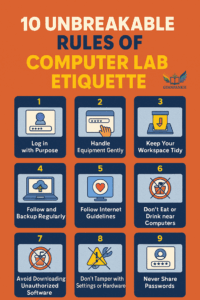
Computer Lab Etiquette: In today’s classrooms, the computer lab isn’t just a room filled with machines—it’s a gateway to creativity, coding, research, and real‑world skills. For many students, the lab is where they first learn to design presentations, explore simulations, or write their first lines of code. It’s a place where ideas take shape, where collaboration thrives, and where digital literacy becomes more than a buzzword—it becomes a lived experience.
But with great access comes great responsibility. Unlike traditional science labs, Computer Lab Etiquette demand a unique blend of digital awareness, physical care, and respectful behaviour. A single careless click can compromise security, and one spilled drink can destroy expensive equipment. That’s why cultivating a culture of discipline in the lab is not just about following rules—it’s about building habits that prepare students for the digital world beyond school.
This Computer Lab Etiquette outlines the essential do’s and don’ts in Computer Lab Etiquette that keep the computer lab safe, efficient, and inspiring. Think of it as a roadmap to becoming a responsible digital citizen.
Computer Lab Etiquette Do’s: Habits That Build Digital Citizenship
1. Log In with Purpose
Every login is a responsibility. Use your assigned credentials and stay focused on the task at hand. Wandering into games, social media, or unrelated websites wastes valuable time and violates lab rules. Logging in with purpose means treating your account as a professional workspace, not a playground.
Example: Imagine you’re preparing a science project presentation. Logging in with purpose ensures you spend your time researching, designing slides, and rehearsing—rather than scrolling through memes.
2. Handle Equipment Gently
Computers are powerful, but they’re also delicate. Keyboards, mice, headphones, and monitors are sensitive tools. Tap, don’t pound. Click, don’t slam. Respect the devices that power your learning.
Tip: Think of the equipment as borrowed tools. You wouldn’t hammer nails with a violin bow—so don’t treat keyboards like drums.
3. Keep Your Workspace Tidy
A cluttered desk leads to accidents. Bags, books, and snacks should stay off the workstation to prevent spills or tripping hazards. A tidy workspace also helps you stay mentally organized and focused.
Classroom impact: When every student keeps their station neat, the lab feels professional—like a shared office where everyone’s work matters.
4. Save and Backup Work Regularly
Few things are more frustrating than losing hours of work because of a crash or accidental shutdown. Save often, and use cloud storage or external backups when possible.
Golden rule: “Save early, save often.” Treat it like fastening your seatbelt—you don’t wait until the car is moving to secure yourself.
5. Follow Internet Guidelines
The internet is vast, but not every corner is safe or appropriate. Use approved websites and tools. If you’re unsure whether a site is trustworthy, ask your instructor first. Following guidelines protects you from malware, misinformation, and distractions.
Digital citizenship lesson: Learning to navigate the internet responsibly is as important as learning to cross the street safely.
6. Log Out and Shut Down Properly
Before leaving, log out of your account, close all programs, and shut down the system if instructed. This protects your data, prevents unauthorized access, and ensures the machine is ready for the next user.
Think of it like leaving a classroom: You wouldn’t walk out without putting away your books—so don’t leave a computer running with your files open.
Computer Lab Don’ts: Mistakes That Disrupt and Damage
1. Don’t Eat or Drink Near Computers
One spill can fry a motherboard or ruin a keyboard. Keep food and drinks out of the lab—even water bottles should be sealed and stowed.
Reality check: A single soda spill can cost hundreds of dollars in repairs. That’s not just your mistake—it’s a setback for the entire class.
2. Avoid Downloading Unauthorized Software
Installing games, extensions, or apps without permission can introduce viruses, slow down systems, or compromise security. The lab is not your personal device—it’s a shared resource.
Analogy: Downloading unauthorized software is like graffiti on a public wall—it affects everyone, not just you.
3. Don’t Tamper With Settings or Hardware
Changing display settings, unplugging cables, or rearranging components may seem harmless, but it can disrupt the entire network. Hardware tampering often leads to wasted class time troubleshooting.
Rule of thumb: If you didn’t set it up, don’t change it.
4. Never Share Passwords
Your login is your responsibility. Sharing it—even with friends—can lead to misuse, data loss, or disciplinary action. Passwords are like house keys—you wouldn’t hand them out casually.
5. Don’t Use Lab Time for Personal Browsing
The Computer Lab Etiquette is for learning. Avoid social media, shopping, or unrelated videos unless they’re part of the assignment. Personal browsing distracts you and others, and it undermines the purpose of the lab.
Perspective: Every minute spent on unrelated browsing is a minute lost from building skills that matter.
6. Don’t Leave Without Reporting Issues
If something crashes, freezes, or behaves oddly, report it immediately. Leaving problems unaddressed affects the next user and the system’s health.
Community mindset: Reporting issues isn’t tattling—it’s teamwork. You’re helping maintain a shared resource.
Comparison Chart: on Computer Lab Etiquette Do’s vs Don’ts
| Category | Do’s | Don’ts |
| Login & Access | Use assigned credentials, log out properly | Don’t share passwords or leave accounts open |
| Equipment Handling | Handle devices gently, keep workspace tidy | Don’t bang keys, unplug cables, or eat near machines |
| Digital Behaviour | Use approved websites, follow internet guidelines | Don’t browse unrelated content or download unauthorized software |
| Work Management | Save regularly, back up important files | Don’t rely on autosave or leave work unsaved |
| System Care | Shut down properly, report issues immediately | Don’t ignore malfunctions or tamper with system settings |
| Respect for Space | Keep noise low, respect others’ focus | Don’t distract peers or misuse shared resources |
Why Etiquette Matters Beyond the Lab
Computer lab etiquette isn’t just about keeping machines safe—it’s about preparing students for the digital workplace. In offices, universities, and professional environments, the same principles apply: respect shared resources, protect data, and stay focused.
- Digital Citizenship: Following rules builds habits of responsibility online.
- Collaboration: Respecting space and focus helps teams work efficiently.
- Professionalism: Treating equipment carefully mirrors workplace expectations.
- Preparedness: Saving and backing up work teaches resilience against technical failures.
Final Thoughts
The Computer Lab Etiquette is more than a room—it’s a training ground for the future. Every login, click, and saved file is part of a larger lesson in responsibility. By following the do’s and avoiding the don’ts, students not only protect valuable equipment but also cultivate habits that will serve them in college, careers, and everyday life.
Digital discipline isn’t about restriction—it’s about empowerment. When students respect the lab, they unlock its full potential as a space for creativity, exploration, and growth. In a wired world, etiquette is the bridge between access and achievement.
Click here for any Help, Click here for any Suggestions.